VINPOWER DIGITAL SHARKBLUCP-S13T-BK Target Ray Bdxl Dvd Cd 842378010683 Disc Duplicator Sharkblucp Usb 3.0 Tb Hdd
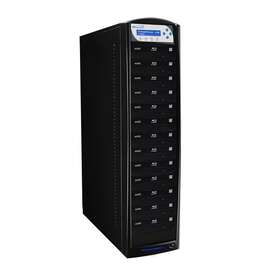
( Brand: Vinpower Digital ), ( Manufacturer Part Number: SHARKBLUCP-S13T-BK ), ( Type: Blu-ray Duplicator ), ( Color: Black ), ( Features: Duplication ), ( Storage Capacity: 2tb ), ( Interface: Usb, Standalone ), ( UPC: 842378010683 )
Review VINPOWER DIGITAL Sharkblucp Target Blu ray Bdxl Dvd Cd Disc Duplicator Usb 3.0 Tb Hdd
The Vinpower Digital Sharkblucp-S13T-BK Sharkblucp 13 is a state-of-the-art Blu-ray, BDXL, DVD, and CD disc duplicator that offers unparalleled speed and reliability. This device is equipped with 13 drives, each capable of reading and writing Blu-ray, BDXL, DVD, and CD discs, making it an ideal solution for professional duplication tasks.
The Sharkblucp 13 features USB 3.0 connectivity, ensuring fast data transfer rates between the duplicator and your computer. It also supports internal 1TB HDD, allowing you to store a large number of disc images for duplication. This feature is particularly useful for businesses that require mass duplication of data.
The device is designed with a compact and sleek black finish, making it a great addition to any professional workspace. It is also equipped with a user-friendly LCD display, which allows you to monitor the duplication progress in real-time. The Sharkblucp 13 is also energy-efficient, with a power consumption of only 150W, making it a cost-effective solution for businesses.
The Sharkblucp 13 is a high-performance Blu-ray, BDXL, DVD, and CD disc duplicator that is perfect for businesses that require mass duplication of data. Its USB 3.0 connectivity, internal 1TB HDD, and user-friendly LCD display make it a reliable and efficient tool for any professional duplication task. With its compact and sleek design, the Sharkblucp 13 is also a great addition to any workspace.
Pros of buying Vinpower Digital Sharkblucp-S13T-BK Sharkblucp 13 Blu-ray BDXL DVD CD Disc Duplicator USB 3.0 TB HDD:1. High Capacity: This duplicator supports Blu-ray BDXL discs with a capacity of up to 128GB, allowing you to duplicate large amounts of data at once.
2. USB 3.0: The USB 3.0 interface provides fast data transfer rates, reducing the time required for duplication.
3. TB HDD: The built-in 1TB hard drive allows you to store multiple projects without the need for an external drive.
4. User-friendly: The device is easy to use with a straightforward interface and clear instructions.
5. Energy-efficient: The power-saving mode helps reduce energy consumption when the device is not in use.
Cons of buying Vinpower Digital Sharkblucp-S13T-BK Sharkblucp 13 Blu-ray BDXL DVD CD Disc Duplicator USB 3.0 TB HDD:1. Price: The duplicator is relatively expensive compared to other CD/DVD duplicators on the market.
2. Size: Due to the large capacity and built-in hard drive, the device is quite large and may not be suitable for users with limited space.
3. Limited compatibility: The device may not be compatible with all types of discs and drives, so it's important to check the specifications before purchasing.
Conclusion:The Vinpower Digital Sharkblucp-S13T-BK Sharkblucp 13 Blu-ray BDXL DVD CD Disc Duplicator USB 3.0 TB HDD is a powerful tool for users who need to duplicate large amounts of data onto Blu-ray discs. Its high capacity, fast data transfer rates, and built-in hard drive make it a convenient option for businesses and individuals who require such functionality. However, its price and size may be a deterrent for some users. Ultimately, if the features and benefits of this device meet your needs, it's a worthwhile investment.
Recommendation:If you frequently need to duplicate large amounts of data onto Blu-ray discs and are willing to invest in a high-quality device, the Vinpower Digital Sharkblucp-S13T-BK Sharkblucp 13 Blu-ray BDXL DVD CD Disc Duplicator USB 3.0 TB HDD is a great choice. Its user-friendly interface and energy-saving features make it easy to use and environmentally friendly. Just be sure to check the compatibility with your existing devices before making a purchase.
Details:
Load blank BD / DVD record able discs into the duplicators writer drive then locate transferred BCP image file through menu keys from internal hard drive. The unique Copy Lock Software can embed a proprietary CPS copy protection encryption into any DVD video master through PC, which will produce VCP or FREE OCP protected image file. Brand New in Box. So the BD CPS has an added cost, but offers a much stronger protection and allows you to use any media you'd like EZ-BDCP no costs as long designated duplicator hardware Appetites manufactured.
Load blank DVD record able discs with the Appetites MID into duplicators writer drive then place OCP master disc top reader tray or locate transferred image file through menu keys from internal hard drive if available. Whether you're copying CDs, DVDs, or Blu-ray discs including the super high capacity BDXL format, SharkBluCP has got you covered. Transfer VCP file through 1 of the 2 options below: Burn onto a master disc.
Features: Complete Standalone Operation No PC required to operate the duplicator. This pioneering machine is the first of its kind to offer advanced copy protection on Blu-ray, BDXL, and DVD discs.
Initiate the copy process and when finished discs are all successfully copied, these will have secure protection already embedded. The VCP or FREE OCP protected image file can then be transferred onto a CPS enabled Vinpower Digital duplicator to produce as many copy reproductions the user needs. With a sleek and easy-to-operate control panel, you can take advantage of features like Auto Copy, Load Copy, Account Management, Hard Drive Partition Naming.
Since BD CPS is software based as opposed to hardware based, there are no issues with compatibility players, unlike competing protections on the market. Protect your valuable content with our innovative copy protection technology.
With this cutting-edge technology, you can transfer your master file from a computer to the Sharkblucp internal HDD, eliminating need burn disc start duplication job. How the FREE EZ-BDCP Copy Protection Works: Take your Blu-ray video master disc or file and load into reader drive internal Hard Drive. These systems also provide DVD copy protection as well. That BCP copy protected image file can then be transferred onto a CPS enabled Vinpower Digital duplicator to produce as many reproductions the user needs.
Copy Protection: Vinpower Digital has developed the first true standalone duplicator which can offer embedded Blu-ray copy protection. Transfer the new OCP image file from PC onto an enabled duplicator via USB w/ Copy Connect or LAN/Network connectivity if available. Instead, by using Vinpower Digitalis BD CPS or EZ-BDCP, you can feel secure at a fraction of the expense with BCP format FREE EZ-BDCP in less time no minimum maximum quantities required. With our versatile duplicator, you can easily duplicate all non-protected Blu-ray, CD DVD discs, including Double/Dual layer formats, making it a one-stop solution for your duplication needs.
Transfer the new BCP image file from PC onto a CPS supported duplicator via USB with Copy Connect or LAN/Network connectivity. Since the CPS technology is software based as opposed to hardware based, there are no issues with compatibility players, unlike competing protections on market. SharkBluCP 13 Target Blu-ray BDXL DVD CD Disc Duplicator w/ 2TB HDD USB 3.0 Add Copy Protection. For the BD CPS, it works very much same as through unique Copy Lock Software, which can embed a proprietary CPS copy protection encryption into any Blu-ray video master PC, produces BCP protected image file.
This ensures that your duplicator will continue to perform at its best for an extended period of time. Say goodbye to the hassle of burning master discs and hello convenience our Multi-File Copy Connection feature. This means that you can now start your duplication in fewer steps, saving time and effort.
Take your DVD video master disc or file and by utilizing the special CPS application, follow steps to embed copy protection onto content. DVD Copy Protection Flow Chart:How the FREE OCP Copy Protection Works: Load supplied Copy Lock software onto a suitable PC. Enjoy faster and more efficient duplication with our Built-in Hard Drive Installed feature. Initiate the copy process using BD Easy Protection application and when finished discs are all successfully copied, these will have EZ-BDCP protection already embedded.
Experience unparalleled convenience with our Multi-File Copy Connection feature. Transfer OCP file through 1 of the 2 options below: Burn onto a master disc. How the BCP Format Copy Protection Works: Load supplied Copy Lock software onto a suitable PC.
As our motto states, Quality and Price that cannot be duplicated. Take your DVD video master disc or file and use the copy protection software application to make an OCP image file; follow steps of embed onto content. Don't compromise on content security - choose our duplicator with copy protection features today. The added cost for the VCP allows you to use any media you'd like and works on DVD R DL media, while OCP has no costs as long Appetites manufactured.
Supports Max Write Speed Up to 16x BD-R write speed and very fast DVD CD speeds, with default max caps for selected medias give optimal burning capability. Transfer the new VCP image file from PC onto an enabled duplicator via USB w/ Copy Connect or LAN/Network connectivity if available. How the VCP Format Copy Protection Works. If you worked hard and put in a lot of effort expense into creating your video project, should't be restricted the number units can sell because can't afford high price replicated copy protection.
Load blank DVD record able discs into the duplicators writer drive then place VCP master disc top reader tray or locate transferred image file through menu keys from internal hard drive if available. Designed to be the most advanced duplicator on market, SharkBluCP is also incredibly user-friendly.
Load blank BD record able discs with the Appetites MID into duplicators writer drive. The difference between the BD CPS and EZ-BDCP version is that requires a license dongle proprietary software in order to add highly secure copy ripping protection onto discs. Take your BD / DVD video master disc or file and by utilizing the special CPS application, follow steps to embed copy protection onto content.
part #: sharkblucps13t price
- $4639.00
specifications dvduplic:
- brand: Vinpower Digital
- mpn: Sharkblucp-s13t-bk
- type: Blu-ray Duplicator
- color: Black
- features: Duplication
- storage capacity: 2tb
- interface: Usb, Standalone
- upc: 842378010683
seller dvduplic:
- detailed rating: Speed: 5/5, Accuracy: 4.98/5, Charges: 5/5, Communication: 5/5
- # feedbacks: 19386
- city: Alhambra, California
- rating: 99.9%
payments dvduplic:
- credit card: Discover
- wallet: Google-pay
general dvduplic:
- condition: New
- Computers/Tablet's Networking > Drives, storage Blank Media > CD, DVD Blu-ray Duplicators
offer dvduplic:
- quantity: 10
- availability: In Stock
- sold: 0
- options: Ship-to-home
- started: November 12, 2023
returns dvduplic:
- method: Money back
- paid by: Buyer
- time: 30 Days
- policy: Returns Accepted
ratings:
- Great seller! Thanks! 10-01-23
- I got exactly what I expected 10-01-23
- Fast delivery, item is in excellent condition. I'm satisfied with my order. 10-01-23
- nice unit burned dual with no problem 10-01-23
- Discs that always work perfectly at a nice price with fast shipping. Thanks once again! 10-01-23
shipping dvduplic:
- service: UPS Ground, UPS 3 Day Select, UPS 2nd Day Air
- class: Standard, Expedited
- carrier: UPS
- transit: 5-7 Days
- type: Calculated
- cost: $0.00
Vinpower Digital SHARKBLUCP-S13T Is Similar To:
- Econ-s1t-bd-bk Vinpower Digital Econ Series To Sata 172302667776 (31.3% similar) Auto dvd format conversion: can convert media between r Re and dvd-r automatically. Features: complete standalone operation: no pc required to operate the duplicator. Multi-language capability: the on LCD screen can be displayed in English, Spanish, french, Japanese more. Able to copy blu-ray discs...(July 31st, 2018)
- Econ-s3t-bd-bk Vinpower Digital Econ Series To Sata 151903520956 (32.4% similar) The econ series is not only economical but also offers truly reliable duplication with an easy to use interface. Able to copy blu-ray discs: duplicate discs as well dvd and cd. These units are truly strong performing systems at a more affordable price point to meet the users growing demands without ...(July 31st, 2018)
- Econ-s4t-bd-bk Vinpower Digital Econ Series To Sata 172302667790 (31.3% similar) Auto dvd format conversion: can convert media between r Re and dvd-r automatically. Supports all currently available blu-ray dvd media including double dual layer: can duplicate single layer DVD Re and formats. Features: complete standalone operation: no pc required to operate the duplicator. Able ...(July 31st, 2018)
- Econ-s5t-bd-bk Vinpower Digital Econ Series To Sata 100177434483 (31.3% similar) Supports all currently available blu-ray dvd media including double dual layer: can duplicate single layer DVD Re and formats. Features: complete standalone operation: no pc required to operate the duplicator. The econ series is not only economical but also offers truly reliable duplication with an ...(July 31st, 2018)
- Hddminidup-2 Vinpower Digital Hddmini To Standalone Sata Hard Drive 842378009281 (20.5% similar) Product features small lightweight compact frame about the size of a tablet for easy travel optional cf support with optional interface module ADD-ON2. The hdd mini supports FAT16 32, ext fat, nets, and EXT2 3/4 file systems. Plus, the fact that hdd mini is so easy to transport, you'll never have ...(October 2nd, 2018)
- Karaoke-s15t Vinpower Digital Sharkcopier To Karaoke Mix Pro Duplicator 842378001964 (45.2% similar) With the ability to copy all cd configurations, dvd configurations including dual double layer discs, and blu-ray shark copier is perfect solution for your duplication needs. Product features complete standalone operation: no pc required to operate the duplicator.: introducing the high powered shark...(February 20th, 2019)
- Ripbox25-s1t-sw Vinpower Digital Ripbox Robotic Automatic Dvd Cd Ripping 842378008437 (33% similar) They can be operated through various software applications Vinpower NPR 2000 lite, a third party freeware. The rip box units are automated systems with a robotic transport arm that connects to computer via usb. Provides data ripping: all files and folder structure is cloned to your hard drive ...(October 10th, 2018)
- Shark-s15t-dc-bk Vinpower Digital Sharkcopier Daisy Chain Duplicator Hdd To 842378001988 (44.3% similar) All units whether used on their own or connected are completely standalone and provide exact Digital copies of cd, dvd discs. Even though each tower can be operated independently, when they are connected together in a daisy chain configuration using special serial cable, the shark copier dc link ...(February 20th, 2019)
- Shark-s9t-bk Vinpower Digital Sharkcopier Cd Dvd Duplicator Copier Standalone 842378010157 (44.9% similar) Introducing the high powered shark copier standalone dvd cd duplicator. When you're looking for the best, look no further. The shark copier offers highest quality and most compatible copies of any duplicator on market. 14 pounds size:'item DIMENSIONS:21. Product features complete standalone ...(February 20th, 2019)
- Aero220-s3t-bk Vinpower Digital Aero 3 842378009977 (29.1% similar) Well, the aery series standalone auto loader duplicator is answer. Maximum 220 disc capacity. Vinpower Digital aery AERO220-S3T-BK 3 target dvd cd automated duplicator with 220 disc capacity 500GB hdd new-retail often those who need to duplicate larger volume of optical discs like and are caught ...(July 10th, 2017)
- Copylock100 Vinpower Digital Duplicator Copylock Copy Protection Dongle Licenses 842378003371 (31.9% similar) For your protection, a delivery confirmation signature is required on most orders. Shipping disputes should be submitted to the carrier directly. As our motto states, quality and price that cannot be duplicated. The delivery date information listed above is ups FedEx to reflect their service ...(September 10th, 2018)